McAfee Security
Log In
Cart
My Account

Recommender

Bundle Center

Upgrade Center

Virus Removal Tools

Virus Calendar

Virus Hoaxes

Virus Glossary

Regional Virus Info

Dispatch:
   Virus Newsletters

Security News Network

Anti-Virus Tips

Online Guide for Parents

Add McAfee alerts
   on your site
Related Links

VirusScan

FreeScan
Virus Profile
Virus Information
Name: W32/Sasser.worm.a
Risk Assessment  
  - Home Users: Medium
  - Corporate Users: Medium
Date Discovered: 4/30/2004
Date Added: 4/30/2004
Origin: Unknown
Length: 15,872 bytes
Type: Virus
SubType: Internet Worm
DAT Required: 4355
Quick Links
Virus Characteristics
Indications of Infection
Method of Infection
Removal Instructions
Aliases
Buy or Update
New Users Get Protected Now:
Buy VirusScan
Update VirusScan
Virus Characteristics Back to Top

-- Update May 1st, 2004 --
The assessment of this threat has been upgraded to Medium due to an increase in prevalence

If you think that you may be infected with this threat, and are unsure how to check your system, you may download the Stinger tool to scan your system and remove the virus if present. 

Note: Infected systems should install the Microsoft update to be protected from the exploit used by this worm. See:
http://www.microsoft.com/technet/security/bulletin/MS04-011.mspx

This self-executing worm spreads by exploiting a Microsoft Windows vulnerability [MS04-011 vulnerability (CAN-2003-0533)]

The worm spreads with the file name: avserve.exe .  Unlike many recent worms, this virus does not spread via email.  No user intervention is required to become infected or propagate the virus further.  The worm works by instructing vulnerable systems to download and execute the viral code.

Indications of Infection Back to Top

The virus copies itself to the Windows directory as avserve.exe and creates a registry run key to load itself at startup

  •  HKEY_LOCAL_MACHINE\SOFTWARE\Microsoft\Windows\
    CurrentVersion\Run "avserve.exe" = C:\WINDOWS\avserve.exe

As the worm scans random ip addresses it listens on successive TCP ports starting at 1068.  It also acts as an FTP server on TCP port 5554, and creates a remote shell on TCP port 9996.

A file named win.log is created on the root of the C: drive.  This file contains the IP address of the localhost.

Copies of the worm are created in the Windows System directory as #_up.exe.

Examples

  • c:\WINDOWS\system32\11583_up.exe
  • c:\WINDOWS\system32\16913_up.exe
  • c:\WINDOWS\system32\29739_up.exe

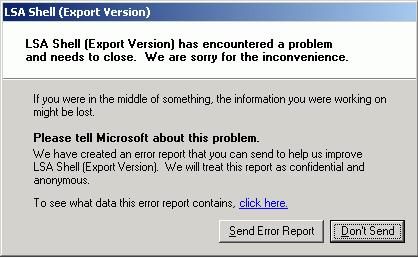
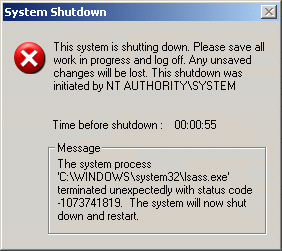
A side-effect of the worm is for LSASS.EXE to crash, by default such system will reboot after the crash occurs.  The following Window may be displayed:

Method of Infection Back to Top

This worm spreads by exploiting a recent Microsoft vulnerability, spreading from machine to machine with no user intervention required.

This worm scans random IP addresses for exploitable systems.  When one is found, the worm exploits the vulnerable system, by overflowing a buffer in LSASS.EXE.  It creates a remote shell on TCP port 9996.  Next it creates an FTP script named cmd.ftp on the remote host and executes it.  This FTP script instructs the target victim to download and execute the worm (with the filename #_up.exe as aforementioned) from the infected host.  The infected host accepts this FTP traffic on TCP port 5554.

The worm spawns multiple threads, some of which scan the local class A subnet, others the class B subnet, and others completely random subnets.  The destination port is TCP 445


Removal Instructions Back to Top

All Users :
Use the specified DAT files for detection and removal.

Alternatively, the following EXTRA.DAT packages are available.
EXTRA.DAT
SUPER EXTRA.DAT

Infected systems should install the Microsoft update to be protected from the exploit used by this worm. See:
http://www.microsoft.com/technet/security/bulletin/MS04-011.mspx

Additional Windows ME/XP removal considerations

Stinger
Stinger  has been updated to assist in detecting and repairing this threat.

Manual Removal Instructions
To remove this virus "by hand", follow these steps:

  1. Reboot the system into Safe Mode (hit the F8 key as soon as the Starting Windows text is displayed, choose Safe Mode.
  2. Delete the file AVSERVE.EXE  from your WINDOWS directory (typically c:\windows or c:\winnt)
  3. Edit the registry
    • Delete the "avserve" value from
      • HKEY_LOCAL_MACHINE\SOFTWARE\Microsoft\
        Windows\CurrentVersion\Run
  4. Reboot the system into Default Mode

Sniffer Customers
Filters have been developed that will look for Sasser traffic [Sniffer Distributed 4.1/4.2/4.3, Sniffer Portable 4.7/4.7.5, and Netasyst].

McAfee Intrushield
This worm is detected in all Intrushield signauture sets 1.5.37.5, 1.8.27.2, 1.9.8.2 and later.  In the IntruShield Alert Viewer, you would see the following alert when Sasser worm propagation is detected:

  • DCERPC: Microsoft Windows LSASS Buffer Overflow (0x47601c00)

Customers with in-line deployment should configure the sensor response of the above signature action to block in the policies.

McAfee System Compliance Profiler
Create a rule to match a registry key

  • Select HKEY_LOCAL_MACHINE from the drop-down box
  • In the field after the drop-down box, enter in the path Software\Microsoft\Windows\CurrentVersion\Run
  • For Value name, enter avserve.exe
  • In the next drop-down box, select "Registry value does not exist"

McAfee Desktop Firewall
To prevent possibly remote access McAfee Desktop Firewall users can block incoming TCP port(s) 5554, 9996

McAfee Threatscan
ThreatScan signatures that can detect the W32/Sasser.worm.a virus are available from:

ThreatScan Signature version: 2004-05-03

ThreatScan users can detect the virus by running a ThreatScan task using the following settings:

  • Select the "Remote Infection Detection" category and "Windows Virus Checks" template.
    -or-
  • Select the "Other" category and "Scan All Vulnerabilities" template.

For additional information:

  • Run the "ThreatScan Template Report"
  • Look for module number #4073

ThreatScan users can detect the remote access component by running a Resource Discovery Task using the following settings:

  • Select TCP Port scan
  •  Enter ports 5554,9996
Aliases Back to Top
W32.Sasser.Worm (Symantec), W32/Sasser.A (F-Secure), W32/Sasser.worm
About McAfee Security Advertise With Us Affiliate Program Contact Us Investors Partners Press Privacy Store Locator
Sign up for Free Virus News:
McAfee is a business unit of Network Associates, Inc.
Copyright © 2003, 2004, Networks Associates Technology, Inc. All Rights Reserved.
McAfee Security for Consumer Privacy Policy.
www.nai.com